User-friendly and comprehensive PDF converter
Solid Converter PDF is a premium productivity program that simplifies the intricate task of converting PDFs into editable Word, Excel, and PowerPoint files. This converter presents a user-friendly interface with a plethora of conversion options tailored to individual needs.
Top Recommended Alternative
Solid Converter PDF doesn't just stop at conversions; it also helps users with PDF creation. You can password-protect your PDFs to restrict viewing, editing, copying, printing, or commenting based on your preferences when you create them. Additionally, you have control over PDF permissions, determining which users can read, print, edit, copy, or comment on your files.
Convert and create editable documents
With its PDF to Word converter, Solid Converter PDF enables you to seamlessly transform PDFs into editable Word documents for hassle-free editing. Meanwhile, the PDF to Excel Converter extracts tables from PDFs into Microsoft® Excel spreadsheets — offering a convenient solution for data manipulation. Lastly, its PDF to PowerPoint Converter employs an Office Open XML .pptx filter, enabling the conversion of PDFs to PowerPoint presentation files without the need for Microsoft® PowerPoint installation.
For those seeking HTML conversion, the program ensures a high-quality reflowed HTML output while preserving styles, tables, and hyperlinks. Moreover, the software offers text extraction capabilities, allowing you to reconstruct text flow order and extract text from existing PDFs. It also excels in scanned PDF recovery, converting legacy scanned PDF files into well-formatted, editable Word documents that you can share with your team.
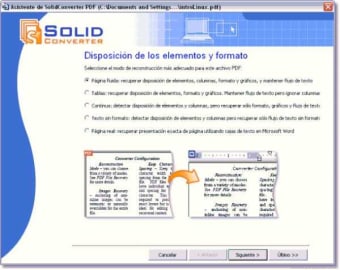
This feature, coupled with Solid OCR offering high-quality Optical Character Recognition in 13 languages, ensures accurate reconstruction of scanned pages. However, the program does have its drawbacks. The interface design appears outdated, which can be unpleasant to the eyes. The process also involves multiple steps, potentially overwhelming users, while the conversion operation is reported to be slow and requires patience.
Master document reconstruction
In conclusion, Solid Converter PDF stands as a robust solution for PDF conversion and reconstruction with its offering of various features to meet diverse user needs. It also makes it easy to create and grant editing permission with its creation capabilities. Despite some drawbacks in interface design and speed, its comprehensive set of tools makes it a valuable asset for those dealing with intricate PDF tasks.